NATIVE TO MAC. BUILT FOR YOUR FLOW.AUTOMATIC LOGGING. ACCURATE STORY POINTS.
Not Just a Task Tracker. A Productivity Booster.
With TaskTicklet, your effort tells the story. Calls, meetings, and interruptions are detected and logged automatically—so your estimated story points burnt reflect the work behind the task.
It finds the interruption. And logs the whole thing.
A call starts. A meeting ends. TaskTicklet detects the start and end of interruptions, captures their duration, and logs them automatically. No reconstructing your day from memory.
START → END → LOGGEDSample notification
TASKTICKLET now
Call ended. Time logged.
TaskTicklet detected when your Zoom call began and ended, then logged all 24 minutes automatically. No audio was accessed.
Zoom call24 min
START DETECTED10:12
→
END DETECTED10:36
→
AUTO-LOGGED24 min
Elapsed1h 24m
−
Call24m
=
Actual task time1h 00m
The interruption is logged separately and removed from task time, keeping your effort and story-point estimates grounded.
◇Automatically logged. Never silently overwritten.
If logging would delete an existing record, TaskTicklet asks first. You stay in control.
03 / STORY POINTS, BACKED BY REAL EFFORT
Know the effort. Auto Measure what you spent.
TaskTicklet estimates the story points burnt for a task using the work behind it. Automatically logged interruptions keep the time spent away from the task out of the picture.
Accurate story points are no longer a wish with TaskTicklet.
A timer alone tells you how long it ran. TaskTicklet captures the interruptions too, giving your task effort—and the story points burnt—a clearer basis.
01
Capture the work.
Track the time spent on each Jira issue from your menu bar.
02
Separate the interruptions.
Calls, meetings, and huddles get their own records, with a start, an end, and a duration.
03
See the points burnt.
Use TaskTicklet's estimate to understand task effort and bring better evidence into sprint planning.
TASK EFFORT → STORY POINTSIllustrative estimate
ENG–482 · SPRINT 24
Refactor sync queue
In progress
ESTIMATED STORY POINTS BURNT2.4 pts
of 3 planned story points
0 pts3 pts planned
Task effortTracked per issue
Calls & meetingsLogged separately
Story points burntEstimated by TaskTicklet
Sample product view. The value illustrates the feature, not a fixed conversion from hours to points.
04 / CODING AGENT TRACKING
Your effort. Your agents. One view of the work.
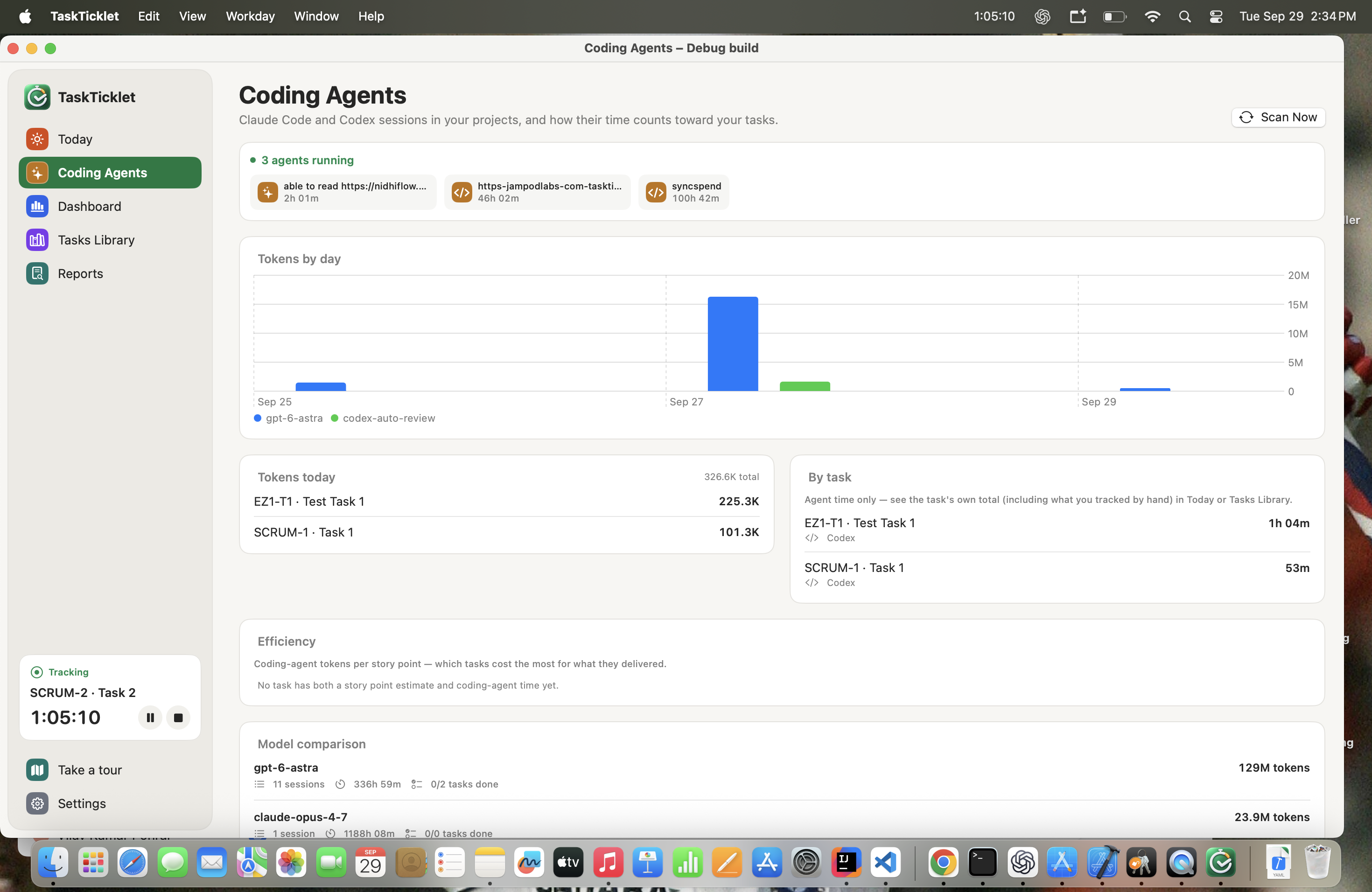
Visualise how your coding agents perform. Measure your combined efforts for a task, with Claude Code and Codex sessions alongside the work you track yourself.
CLAUDE CODE + CODEX
From a running session to the task it contributes to, see where agent time and tokens go.
01 / LIVE SESSIONSFREE
Know what's running.
See active coding agents, their projects, and session durations in one place. Scan for the latest sessions when you need an update.
02 / TOKEN USAGEFREE
Follow the tokens.
See today's total token usage, free. Break it down by model or by task with TaskTicklet Pro.
03 / TASK EFFORTPRO
Connect agents to outcomes.
See agent time per task. Find the task's combined effort, including your manually tracked work, in Today or Tasks Library.
04 / EFFICIENCYPRO
Put usage in perspective.
Compare coding-agent tokens per story point when a task has both a story-point estimate and agent time.
05 / MODEL COMPARISONPRO
See how models perform.
Compare models by tokens, sessions, recorded time, and task completion. Understand the activity behind each model's contribution.
06 / THE COMPLETE PICTUREPRO
Your work, together.
Bring Claude Code and Codex activity into TaskTicklet so your task history reflects both your effort and your agents' contributions.
Agent time stays visible separately. Your task's total brings it together with the work you tracked.
YOUR WORK, ON THE RECORD↗
PERFORMANCE REVIEW
Small efforts. Visible impact.
Sprint 24 · Sample review
01
The wins
Shipped the sync queue refactor. Closed 12 issues across the sprint.
✓
02
The milestones
Platform release delivered, with tracked effort behind the work.
✓
03
The strengths
Consistent focus sessions on high-priority engineering tasks.
✓
04
The next opportunity
Cluster reviews to reduce context switching between tasks.
↗
READY FOR YOUR NEXT 1:1PDF / MARKDOWN
05 / PERFORMANCE REVIEW
Own Your Performance Reviews, Confidently
Walk into performance reviews and 1:1s with your managers and senior leaders confidently. Your TaskTicklet performance review report brings your achievements, effort, and progress together, so you can speak about your impact with clear evidence.
Your wins, with weight.
Significant tasks, finished projects, and milestones—with the real effort behind them.
Your strengths, with context.
Show the patterns worth celebrating. Name the gaps worth improving, on your own terms.
Your story, ready to share.
Bring a PDF or Markdown export to your next 1:1, raise discussion, or promotion conversation.
06 / BEYOND THE TIMER
Don't just track time. Make room for focus.
A busy day and a focused day can feel the same. Seven small signals help you see the difference—and find a rhythm that works for you.
YOUR DAY, AT A GLANCESample data
82FOCUS SCORE
A little more in flow
See the pattern. Protect the progress.
Your daily focus score puts sessions, switches, and breaks in perspective.
3h 42mFocused work
4Focus sessions
3Task switches
09:00YOUR FOCUS SESSIONS17:00
⇄
Every switch has a story.
Capture why you switched or paused. Spot the patterns behind the interruptions.
Quick questionBlockedNew priority
☾
Your off switch, built in.
Track your breaks. Auto-pause when your Mac sleeps. Set work hours for an end-of-day pause and a morning resume prompt.
Connect Jira once, pick your task, and get back to work. Your menu bar keeps the controls close while TaskTicklet captures the context.
01
Connect your Jira workspace.
Your sprints and issues sync in. Search by title or Jira key to jump straight to the right task.
02
Start, pause, or switch.
Every task has its own control. Breaks are tracked separately, so your time follows your attention.
03
Let TaskTicklet fill in the gaps.
Automatic interruption logging feeds a clearer picture of task effort, story points burnt, and your sprint.
YOUR MENU BAR, EXPANDEDTry the preview
TODAY'S TASKS4 items
No matching tasks. Try “ENG” or “review”.
Tracking Refactor sync queueSample workspace
THE BIG PICTURE, WITHOUT THE GUESSWORK
Your sprint. With the missing pieces.
Time by issue, patterns across the sprint, and the interruptions in between. Move from tracking the day to understanding it.
Interactive preview · Illustrative data
Your work, in perspective
Sprint 24 ⌄
Tracked time32h 40mAcross your sprint
Focused work24h 10mTime spent on your issues
Interruptions5h 20mThe context around the work
Issues completed12Progress you can point to
How the week unfolded
● Focus● Interruptions
8h6h4h2h0
MonTueWedThuFri
Time by status
HOURS
The work and the interruptions belong in the same picture. Now they are.
↗
Look beyond the total.
Break down tasks by status and interruptions by kind.
⇄
Spot the switching.
See active-sprint trends and the cost of changing context.
↓
Take the story with you.
Export reports as PDF or Markdown for the next conversation.
YOUR ROLE. YOUR RULES.
“Real work” isn't one-size-fits-all.
A call can be an interruption for a developer and the whole point for sales. Decide what counts as work, an interruption, or neither.
BUILT AROUND DEEP WORK
Protect the time it takes to build something great.
Separate hands-on engineering from the calls and conversations that surround it. Give your next estimate a real starting point.
AN EXAMPLE OF YOUR RULESFULLY CONFIGURABLE
Jira issue timeCounts as work
Unplanned callsInterruption
Personal calendar eventsIgnore
Illustrative setup. You choose how each activity is classified.
ALREADY PART OF YOUR DAY
Everything connects. Nothing gets in the way.
Keep the tools you know. TaskTicklet brings the context together—from the issue you're building to the meeting you just left.
J
Jira
Your issues. Your sprints. Your real time.
THE HEART OF YOUR WORKFLOW
CALENDARS
Know what's planned.
Google Calendar ↗
Outlook / Microsoft 365 ↗
Calendly ↗
Zoho Calendar ↗
CONVERSATIONS
See what happened.
Zoom ↗
Microsoft Teams ↗
Slack ↗
Zoho Meeting ↗
Google Calendar and Outlook / Microsoft 365 connect through macOS Internet Accounts. Product names identify compatible services; no endorsement is implied.
PERSONAL INSIGHTS. PERSONALLY YOURS.
Your Mac. Your data. Your business.
Understanding your work shouldn't mean handing it over. TaskTicklet keeps your data on your Mac, with no TaskTicklet account and no tracking.
No. TaskTicklet only sees counts—how many DMs and @mentions you received while focused—never message text or content.
What happens when my Mac sleeps?
Tracking pauses automatically. Nothing keeps running while your Mac is asleep, and you'll get a prompt to resume in the morning.
Does it change my Jira issues?
No. TaskTicklet measures the real time behind each Jira issue so your estimates get more accurate over time. Its story-point estimates stay in TaskTicklet; it does not write story points, or anything else, back to Jira.
Does it listen through my microphone?
No. Calls are noticed from whether your Mac's microphone is in use, not from anything said. TaskTicklet never listens to audio and needs no microphone permission.
Where is my data stored?
On your Mac, in a local SQLite database. There is no TaskTicklet account and no TaskTicklet server it could be sent to. Connected-service tokens are kept in the Keychain.
How long is my data kept?
18 months, automatically. Older records age out on their own.
LESS GUESSING. MORE KNOWING.
It's your time. See the whole story.
From the first task to the next big milestone. Make every hour make sense with TaskTicklet.